Stoiq for Mac
A desktop pet with a job.
A small yeti who lives on your Mac desktop. He walks the bottom of your screen, watches your cursor, waves when you find him — and you can pick him up and carry him anywhere, including across monitors.
He’s not a screensaver and he’s not a sticker. He keeps a plant. He goes places and mails you postcards. And while you work, he keeps you company — that part is the job.
the pet is free · native macOS · macOS 15 or later
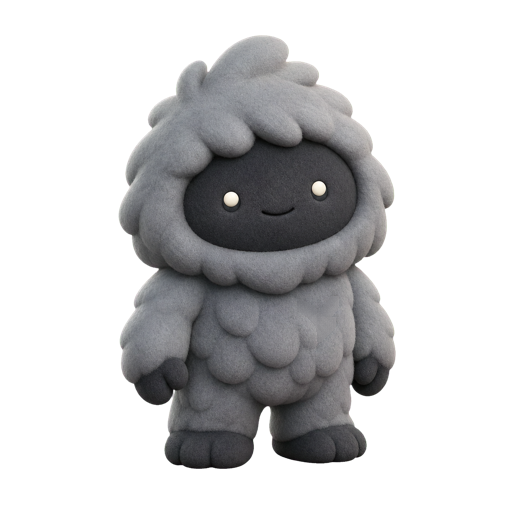
found a good corner. i live here now.
The lineage
You’ve met one before.
A sheep that fell asleep on your taskbar in 1998. A shimeji climbing the side of a YouTube window. Desktop pets are one of computing’s oldest good ideas: a little life on the screen, for no reason except that it’s nice.
If a pure toy is what you want, the free shimeji ecosystem is still out there and still delightful — we’d never talk you out of it. Stoiq is what happens when the pet grows up a little: same warmth, same pointless walks across your screen, plus a reason to be there that lasts past the first afternoon.
What he does all day
Actually alive, not looping.
He stands where you put him.
Grab him with the cursor and carry him anywhere — he crosses the gap between two monitors like a real thing crossing a doorway. Set him down; that’s his spot now.
He takes walks.
A few times a day he ambles across the bottom of the screen — real gait, real footsteps, no teleporting. Then he settles and faces you again.
He notices you.
His eyes follow your cursor. Hover and he might wave. He blinks, he breathes, and at no point does he ask you to buy coins.
He keeps a plant.
A monstera from the cloud forest he’s from grows in his corner. It only ever grows — leave for a month and it’s simply bigger when you’re back.
He goes places.
While you focus, he wanders off and comes back with things — a postcard from a fjord, a find for his shelf. Everything he brings is yours for good.
He shows up when it counts.
Mid-focus, when a feed swallows the hour, he climbs into the tab itself and offers the way back. A pet that does something — that part is the job.
The company he keeps while you work has a name, if you want the longer story: body doubling.
Questions
Asked plainly.
What is a desktop pet?
A desktop pet is a small animated character that lives on your computer screen — walking along your windows, reacting to your cursor, keeping you company while you use the machine. The idea goes back to the nineties (eSheep, and later the shimeji characters), and it never really left.
Is Stoiq a desktop pet for Mac?
Yes. Stoiq is a native macOS desktop pet — a small yeti (or a red panda, or a raccoon) who stands in the corner of your desktop, breathes, blinks, watches your cursor, takes walks across the bottom of the screen, and can be picked up and carried anywhere, including across monitors.
Does the pet do anything, or is it just decoration?
He has a job. Stoiq is also a focus app: the pet asks what you're working on, keeps you company through focus blocks, and appears in the tab when a distracting site takes over. The pet is free; the focus machinery is the paid part.
Will a desktop pet slow down my Mac?
Stoiq is a native Mac app, built to sit quietly: the companion idles at a small fraction of one CPU core, and macOS's Reduce Motion setting is respected throughout.
Are there free desktop pets?
Yes — the shimeji ecosystem is free and delightful, and if you want a pure toy, it's a fine answer. Stoiq's pet is also free. The difference is that he has something to do besides the bit: a plant that grows in his corner, postcards he brings back, and a focus practice he keeps you company through.
Keep reading
Adopt
The corner of your screen is empty.
The pet is free, forever. Stoiq the app is a focus tool built around him; it can’t read your screen, and everything it knows stays on your Mac.